










1win APK Download for Android in India
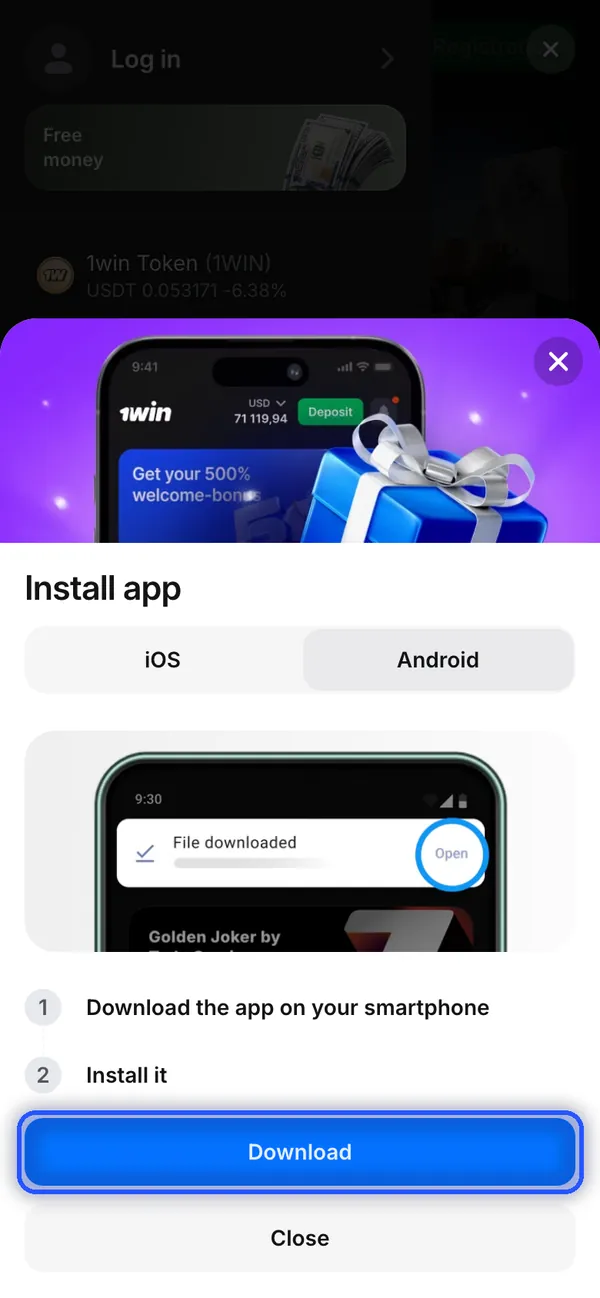
Download the 1win APK from the operator's website: open Menu, choose the 1win for Android banner and press Download. The route runs from Menu to the Install app window. Aviator and Tower Rush have their own game pages inside the casino.
18+ · New players only · Operator bonus terms apply · Play responsibly
 Written by Anusha Khan · Checked by: Denise MatheyUpdated
- The 1win app download for Android is a website APK.
- Use the operator's Install app window rather than a Google Play listing; Android is selected beside iOS and the blue Download button starts the website download route.
1win APK download at a glance
The Android file comes from the website, with the India account context and installation offer shown below.
| Detail | What to use |
|---|---|
| Android format | APK from the operator's website |
| Starting control | Menu in the bottom navigation |
| Menu banner | 1win for Android |
| Download window | Install app with Android selected |
| India account currency | INR, shown as Indian rupee in registration |
| Sign-in credentials | Phone number or email, plus password |
| Installation offer | 200 1win Points on 08.11.2026 |
| Help | Support 24/7 in the side menu |
For iPhone or iPad, the Safari Add to Home Screen route supplies the platform alternative.
Get the 1win APK from the Android download menu
Menu opens the Android download route in the India English website on 08.11.2026; the blue outlines mark the controls to tap.
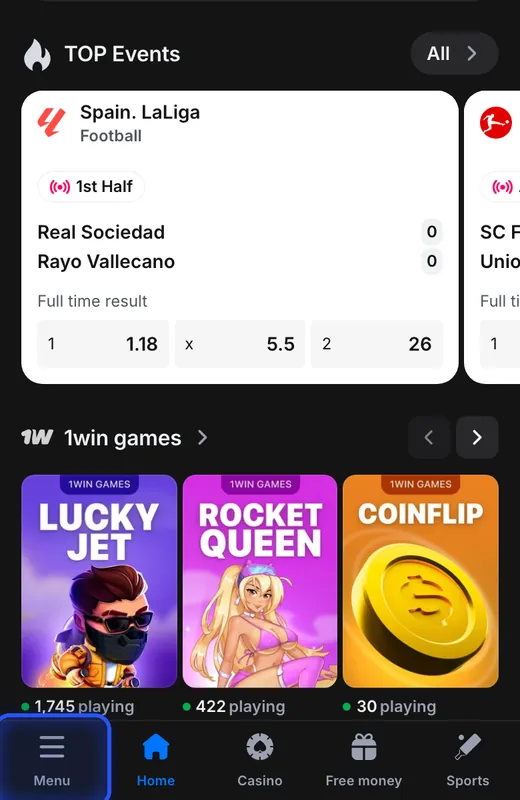
Open the bottom Menu
On the operator's mobile website, tap Menu at the bottom of the screen.
You see: The side menu contains Casino and Sports, with a 1win for Android installation banner below the menu entries.
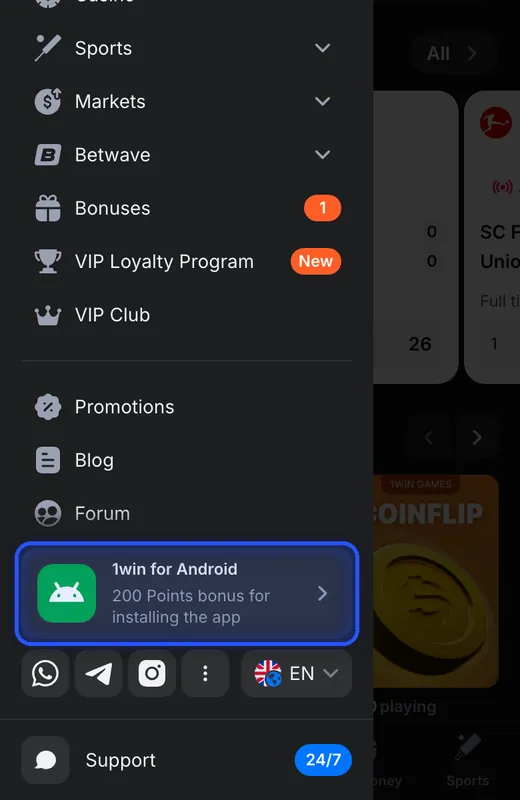
Choose 1win for Android
Tap the highlighted 1win for Android banner in the side menu.
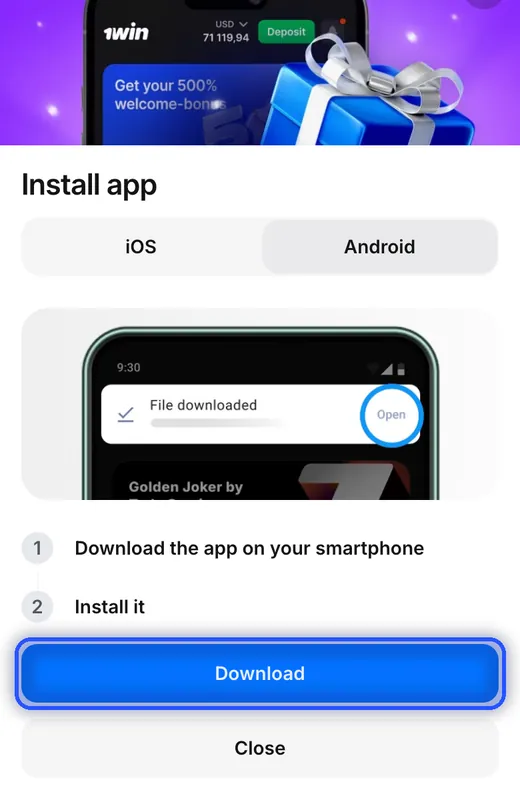
You see: Install app opens with iOS and Android tabs. Android is selected, and Download appears below the installation instructions.
If not: For an installation question, Support is available in this menu.
Press Download on Android
Keep Android selected and tap the blue Download button.
You see: The window says to download the app, then install it. File downloaded and Open appear inside its illustration.
If not: If the download or installation fails, use Support in the side menu.
Install the downloaded Android file
The APK installs through Android, while the Install app window explains the website download route.
| Part of the process | Meaning for the player |
|---|---|
| Download button | Starts from the operator's Android installation window |
| File downloaded and Open illustration | An example inside the website panel, not your phone's download status |
| Unknown sources permission | Android must permit installation of the APK obtained from the website |
| Install it instruction | Installation follows the download of the Android file |
The illustrated Open label is part of a picture, so use the actual downloaded APK for installation rather than tapping the pictured phone. Android's permission for unknown sources applies to installing the website file.
The menu advertises 200 1win Points for installation on 08.11.2026. This is a Points reward, not a cash payment; the bonus overview distinguishes Points from deposit offers.
Use your account contact details for login
Phone and Email are the website sign-in tabs; password recovery opens from the Login form.
Open Login on the website
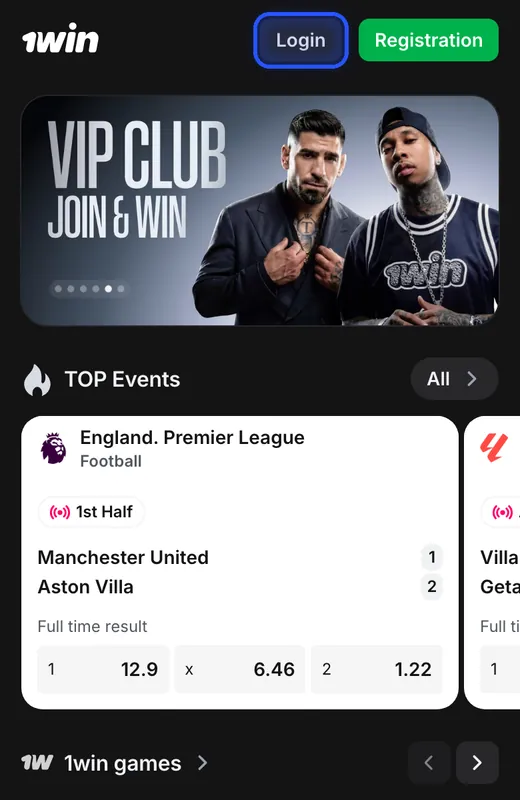
Tap Login at the top of the operator's mobile website.
You see: The Login form opens with Phone and Email tabs, a Password field and the Log in button.
Enter your account credentials
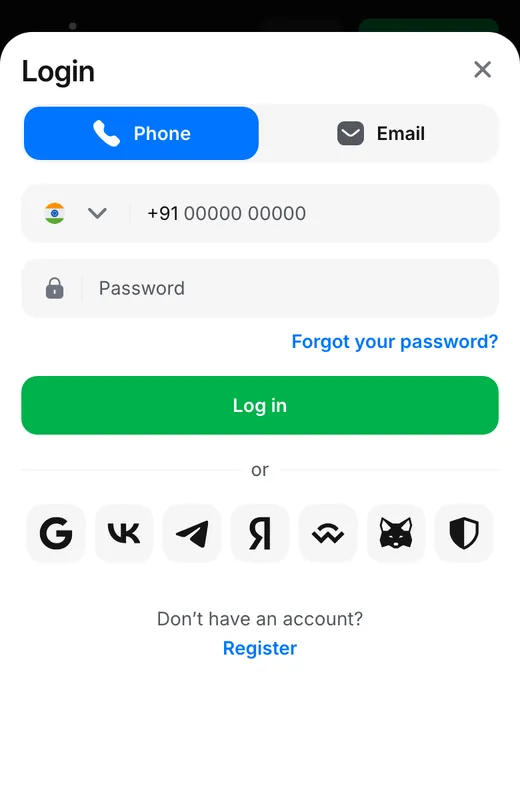
Choose Phone or Email and enter the matching account contact and password.
You see: The form has a Log in button to submit the credentials, with Forgot your password? available for recovery.
If not: If the password fails, use the recovery option shown in the next step.
Open password recovery
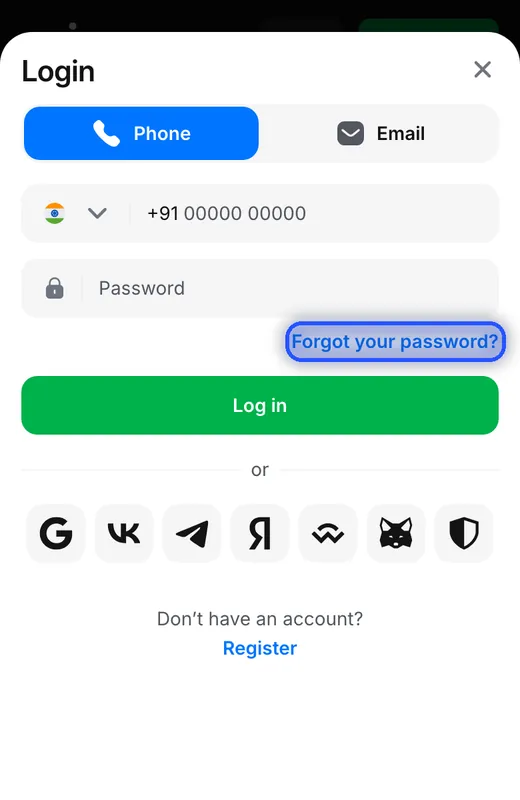
Tap Forgot your password? in the Login form.
You see: Password recovery opens with Phone and Email tabs, a Recover button and an instruction to enter a contact to receive a code.
If not: For a recovery problem, the form also offers contact with support.
Downloading the file and creating an account are separate actions: 1win permits one account per customer. The registration form includes account currency and contact fields for a new account.
The India registration example uses a rupee account; in other countries the form preselects that country's own currency. The India currency shown here is a local account setting.
Aviator and Tower Rush are casino game destinations
Aviator and Tower Rush open as game pages within the casino; the platform APK is the Android download destination.
| Game | Provider | Controls on the game page |
|---|---|---|
| Aviator | Spribe | Log in and Demo mode |
| Tower Rush | Galaxsys | Log in and Demo mode |
The Aviator game page and Tower Rush game page offer account access and demo play within the platform. The casino lobby groups games and provides Search and Providers controls.
Sports appears beside Casino in the side menu. The sports betting section includes live and upcoming events, with cricket markets for the India audience.
Resolve download and account access problems
Support in the side menu handles download and installation questions; password recovery handles account credentials.
The window shows iOS
Select Android in Install app to use the APK route. The iOS alternative uses Safari and Add to Home Screen.The pictured Open control does nothing
Open sits inside the panel's illustration. The actual website control for obtaining the APK is Download below the instructions.The APK download or install fails
Use operator support for the download or Android installation problem; the menu contains the Support entry.The account password fails
Forgot your password? opens recovery using the account phone or email. Account recovery follows the contact associated with registration.
Android file and account terms
- APK
- An Android installation file downloaded to the phone before the app is installed.
- INR
- Indian rupee, the account currency shown in the India registration form.
- 1win Points
- Reward points offered for activities including app installation; the installation banner describes a Points reward rather than a cash payment.
Sources
Where the facts on this page come from
- 1win mobile websiteIndia download and login screens, 08.11.2026
- 1win Free MoneyApp installation Points offer
- 1win rulesAccount and password rules
1win app download and APK questions
The operator's website supplies the Android APK through its mobile menu. Choose the 1win for Android banner and use Download in the Install app window. The operator's website is distinct from this information site.
Download the APK through the Android installation window, then install the downloaded file with Android's permission for unknown sources. The window's File downloaded and Open labels belong to its illustration; they are not a download-status message from your phone.
Menu in the bottom navigation leads to the Android banner in the India English interface. The illustrated download route follows the India website as it appeared on 08.11.2026.
Phone number or email plus password are the account sign-in methods. The website Login form also has Forgot your password? for recovery; login and recovery use the account's contact details.
Aviator is a Spribe game in the 1win casino. Its game page offers Log in and Demo mode, so the Aviator game route takes you to the title within the platform.
The 1win Android APK is the platform download; Tower Rush is the Galaxsys title in the casino search results. The Tower Rush game page offers Log in and Demo mode.
The Android banner in Menu supplies the platform APK. Sports is a separate menu entry for sports betting, including cricket markets.
- First version of the page.
Who runs this page
1win.uk.com is an information site, not 1win and not its official page: no deposits, bets or accounts are handled here.
For adults (18+) only. If play stops being fun, plan a budget and find help.
 New account offer